Organize Your Life with a Charming Dog Theme Digital Planner
For the dog lover who also craves structure, the daily grind of managing schedules, projects, and personal goals can feel like a chaotic game of fetch. Your to-do list scatters in different directions, and important dates sometimes get buried under a pile of other responsibilities. If you're a creative professional, a busy entrepreneur, or simply someone who loves to plan, you know that the right tools can make all the difference. What if your organizational system could be as joyful and loyal as your favorite canine companion? This is where a thoughtfully designed dog theme digital planner steps in, transforming mundane scheduling into a delightful, engaging ritual.
More Than Just Cute Dogs: A Deep Dive into the Digital Planner's Design
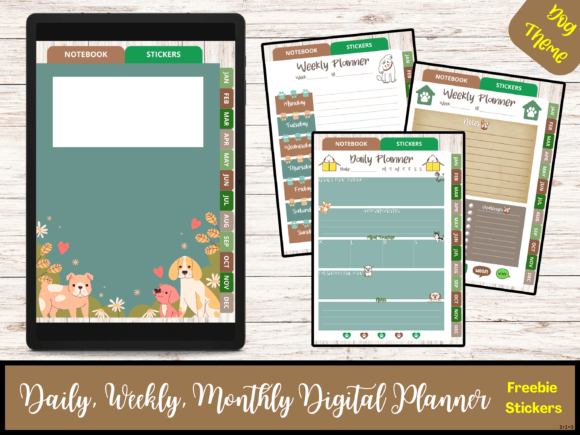
At first glance, the appeal is obvious: charming dog illustrations and paw-print accents. But the true value of this Dog Theme Digital Planner lies in its robust, professional structure designed for real-world use. It’s a comprehensive 525-page PDF document, sized in the versatile A4 portrait format, ready to be imported into your preferred PDF annotation app like GoodNotes, Notability, or Xodo. The personality is warm and inviting, blending whimsy with clean, modern typography to ensure your plans are always easy to read.
The visual style balances playful dog motifs with a highly functional layout. Each month is equipped with 31 daily planner pages, offering granular control over your time—perfect for detailed to-do lists, hourly scheduling, or journaling. Accompanying this are 10 weekly planner pages per month, ideal for a broader view of your projects, content calendar, or marketing campaigns. The system also includes 15 dedicated notebook pages for brainstorming sessions, meeting notes, or project outlines, and 5 pages for stickers. The freebies are a standout feature: 2 sticker pages in PNG format. These digital stickers, featuring dog-themed icons and labels, allow for personalization and visual coding without cluttering the core planner pages.
Practical Applications: Where This Planner Shines for Creatives and Professionals
This isn't just a personal diary. Its structured design makes it a powerful asset across multiple professional domains. For the content creator or blogger, the monthly and weekly spreads are perfect for plotting out an editorial calendar. You can use the daily pages to draft social media copy, plan video shoots, or track engagement metrics. The notebook section becomes a repository for content ideas and keyword research.
Entrepreneurs and small business owners will find the hyperlinked structure a game-changer for productivity. Navigating between months, weeks, and days is seamless, mimicking the tactile feel of a physical planner but with digital superpowers like search, undo, and cloud backup. Use it to manage project timelines, client meetings, and financial reviews. The dog theme adds a touch of personality to your business planning, which can be a refreshing break from sterile corporate templates.
For designers and marketers, the planner serves as a visual project management tool. Sketch wireframes in the notebook pages, track client feedback on daily logs, and plan campaign launches on the weekly spreads. The included sticker PNGs can be used to create visual keys—like a paw print for urgent tasks or a bone icon for completed items—enhancing your visual hierarchy and making the planner both functional and fun.
Integrating the Planner into Your Workflow: Tips for Maximum Efficiency
Adopting a new planning system requires a bit of strategy. First, choose your PDF annotation app based on your device ecosystem and feature needs. Apps with robust hyperlink navigation and sticker import capabilities will unlock this planner's full potential. Once imported, take a few minutes to set up a system. You might color-code the dog-themed stickers for different life categories: one color for client projects, another for personal errands, and a third for creative pursuits.
The strength of a digital planner is its flexibility. Don't feel constrained to use every daily page. Some professionals might only use the weekly spreads for high-level planning and dip into daily pages for particularly busy weeks. The notebook section is your sandbox—use it for anything from mind maps to gratitude lists. Because it’s a PDF, you can duplicate pages as needed. If a single project requires ten pages of notes, simply copy and paste the notebook template.
Evaluating the Fit: Is This Dog Theme Planner Right for You?
Consider this planner if you value a blend of aesthetic charm and meticulous organization. Its digital planner format is ideal for those who want to reduce paper clutter, access their plans across devices via cloud sync, and enjoy the customization that digital annotation allows. The dog theme is particularly well-suited for pet-related businesses, veterinary professionals, dog trainers, or anyone who simply finds inspiration and joy in their furry friends.
Before committing, think about your planning style. If you thrive on detailed daily scheduling, the 31 pages per month are a perfect fit. If you’re a big-picture thinker, the 10 weekly pages will be your primary workspace. The 525-page count indicates a year-long commitment, which is excellent for consistency but requires a willingness to maintain a single system. As an instant digital download, you receive the files immediately, allowing you to start planning within minutes—no shipping, no wait.
Ultimately, this dog theme digital planner is more than a novelty. It’s a serious organizational tool wrapped in a cheerful, dog-loving package. It respects your time with its logical structure while respecting your personality with its playful design. By integrating it into your daily routine, you can bring a sense of order and a smile to your professional and personal planning, proving that productivity and passion can indeed go hand in paw.